游戏设计#
Pygame是一个专门用来开发游戏的 Python 模块,主要为开发、设计2D电子游戏而生,它是一个免费、开源的第三方软件包,支持多种操作系统,具有良好的跨平台性(比如 Windows、Linux、Mac 等)。
帧(frame)#
游戏的核心是循环(game loop)。这个循环不断运行,一遍又一遍的地完成所有让游戏运行所需的操作。游戏的一次循环称为一帧。
在每一帧中可能发生很多事情,但它们可以分为三个不同类别:
处理输入(或事件) 这些是游戏对用户行为做出的响应,可能是键盘按键、鼠标点击等。
更新游戏 这是在每一帧里修改的所有内容。如果物体在空中,它的位置、速度会被重力影响;如果两个物体相撞,它们会爆炸。
渲染(或者绘制) 我们需要在屏幕上绘制所有内容,包括背景、角色、菜单或玩家需要看到的任何其他内容。
时钟#
游戏循环的一个重要方面是控制循环的运行速度。在游戏中,我们将循环的速度称作FPS(Frame Per Second),也就是每秒帧数。FPS表示每一秒钟的循环次数。
FPS指标对游戏很重要,因为游戏运行太快或者太慢都不是一件好事。
事件#
每当玩家与你的游戏交互——点击按钮,拉出菜单,或者按下按键、滑动鼠标——操作系统就会生成一个事件。Pygame 定义了一个专门用来处理事件的结构,即事件队列,该结构遵循遵循队列“先到先处理”的基本原则,通过事件队列,我们可以有序的、逐一地处理用户的操作(触发事件)。下述表格列出了 Pygame 中常用的游戏事件:
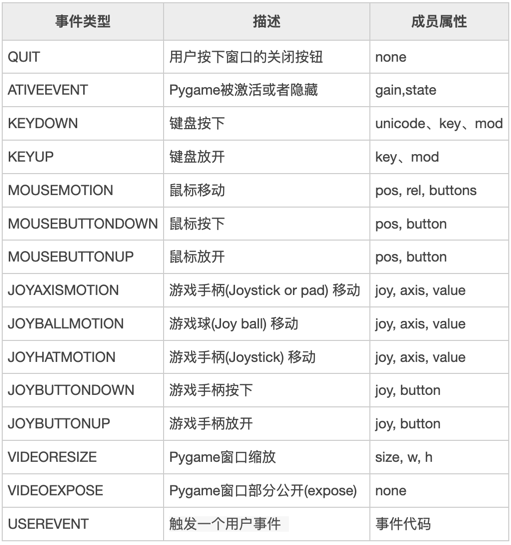
pygame.event.get(): 返回当前全部事件
for event in pygame.event.get(): 遍历全部事件
event.type: 事件类型
开始构建一个PyGame模版#
现在我们知道了游戏的一些关键信息,我们可以开始编写一个最简单的游戏。这个游戏只包含一个游戏窗口。
首先声明游戏变量WIDTH和HEIGHT,代表游戏窗口的大小。
import pygame

WIDTH = 400  # 游戏窗口的宽度
HEIGHT = 400 # 游戏窗口的高度
FPS = 30     # 每秒帧数
---------------------------------------------------------------------------
ModuleNotFoundError                       Traceback (most recent call last)
/tmp/ipykernel_482/1762501490.py in <module>
----> 1 import pygame
      2
      3 WIDTH = 400  # 游戏窗口的宽度
      4 HEIGHT = 400 # 游戏窗口的高度
      5 FPS = 30     # 每秒帧数

ModuleNotFoundError: No module named 'pygame'
接下来初始化游戏窗口:
# 初始化pygame并创建窗口
pygame.init()
screen = pygame.display.set_mode((WIDTH, HEIGHT))
pygame.display.set_caption("My Game")
clock = pygame.time.Clock()
游戏循环:每一轮循环都要经历响应事件 -> 更新游戏状态 -> 渲染屏幕三个过程。
while running:
  clock.tick(FPS)
  for event in pygame.event.get():
    if event.type == pygame.QUIT:
       running = False

  screen.fill((255, 255, 255))

  pygame.display.flip()

pygame.quit()
Ex1:创建400x400的白色窗口#
https://replit.com/@scls-cs/Game0
import pygame
pygame.init()

width = 400
height = 400

screen = pygame.display.set_mode((width, height))

pygame.display.set_caption("window title")

clock = pygame.time.Clock()
FPS = 30

running = True
while running:
  clock.tick(FPS)
  for event in pygame.event.get():
    if event.type == pygame.QUIT:
       running = False

  screen.fill((255, 255, 255))

  pygame.display.flip()
Ex2:按下鼠标使窗口闪烁#
https://replit.com/@scls-cs/Game1
import pygame

pygame.init()

width = 400
height = 400

screen = pygame.display.set_mode((width, height))

pygame.display.set_caption("window title")

clock = pygame.time.Clock()
FPS = 30
count = 0

running = True
while running:
  clock.tick(FPS)
  for event in pygame.event.get():
    if event.type == pygame.QUIT:
       running = False
    if event.type == pygame.MOUSEBUTTONDOWN:
      count += 1
  if(count%2 == 0):
    screen.fill((255, 255, 255))
  else:
    screen.fill((0, 0, 0))
  pygame.display.flip()
Ex3:通过移动鼠标改变屏幕颜色#
https://replit.com/@scls-cs/Game2
import pygame

pygame.init()

width = 200
height = 200

screen = pygame.display.set_mode((width, height))

pygame.display.set_caption("window title")

clock = pygame.time.Clock()
FPS = 30

running = True
while running:
  clock.tick(FPS)
  for event in pygame.event.get():
    if event.type == pygame.QUIT:
      running = False
    if event.type == pygame.MOUSEMOTION:
      x,y = pygame.mouse.get_pos()   #返回鼠标的坐标(x,y)
      screen.fill((x, y, 255))
  pygame.display.flip()